
📡
Xtream Codes & M3U
Compatible with Xtream Codes servers and M3U / M3U8 playlists. The app sorts everything automatically.
Media player · Premium IPTV
A sleek media player, built for the remote, that brings together your channels, movies, series, replay and your local files in a single app — no ads, no tracking.
Thirty seconds to get the experience: smooth navigation, rich EPG, instant playback.
Sources & catalog
Compatible with the standard IPTV protocols. Everything is sorted neatly, with logos, metadata and quick remote navigation.
Compatible with Xtream Codes servers and M3U / M3U8 playlists. The app sorts everything automatically.
Manage multiple subscriptions or servers on the same device. Switch between them with one click.
All your channels sorted by category, with logos and full program guide. Zapping like a TV box.
VOD catalog with posters, detail cards, cast, years, ratings. Series organized by seasons and episodes.
Your radio stations in the background while you watch something else. Docked mini audio player.
Catch up on programs broadcast in the last few days, via your server's timeshift. EPG shows what's available.
Player — built for the big screen
Native playback, hardware decoding, 100% remote-control navigation. No web layer, no lag.
mpv engine on Windows, ExoPlayer on Android TV — hardware decoding HEVC / H.264, AC3, HLS. No stuttering.
Selection of multiple audio tracks and subtitles, image format adjustment, audio channels, subtitle delay.
Interface designed for the D-pad: up/down/left/right + OK. Everything accessible without mouse or keyboard.
At the end of an episode, the next one starts with a countdown, streaming-platform style. Cancellable in one click.
On a series, the app recognises the opening titles and offers to skip them. It learns by listening to your episodes, on the device — no audio ever leaves it. From the second episode on, it just happens.
The "Continue watching" row remembers where you left off on every movie, every episode, across all your accounts and profiles.
Fast forward and rewind, quick channel zapping with EPG preview, chapter by chapter in local files.
Organization & personalization
Mark, sort, set aside, find again. The app learns what you watch and always brings you back to what matters.
Mark your favorite channels, movies and series. Add content to watch later — accessible in one click.
Two automatic categories: what you've finished, and what you're currently watching. Never wonder again.
Pick a show in the EPG, the app notifies you when it starts — wherever you are in the application.
Search across channels, movies, series and local files at once. Filters by rating, decade, quality, genre.
Reorder the home rows however you want. "Continue" first, your favorites next, new releases below.
FR, EN, ES, IT, PT, DE, TR, AR, HE, RU — the choice applies everywhere, instantly.
Profiles
Each one at home, in the same household.
Create a profile per household member: favorites, history, playback resume and watchlist are kept separately, on the same IPTV subscription. Each one finds their ongoing series and favorite channels, without having to filter out the others.
New · Simple Mode
For people who find technology daunting, and for children. A profile becomes a plain television: a grid of the channels you picked, shown large, with what is on right now. No menus, no settings, nothing to figure out.
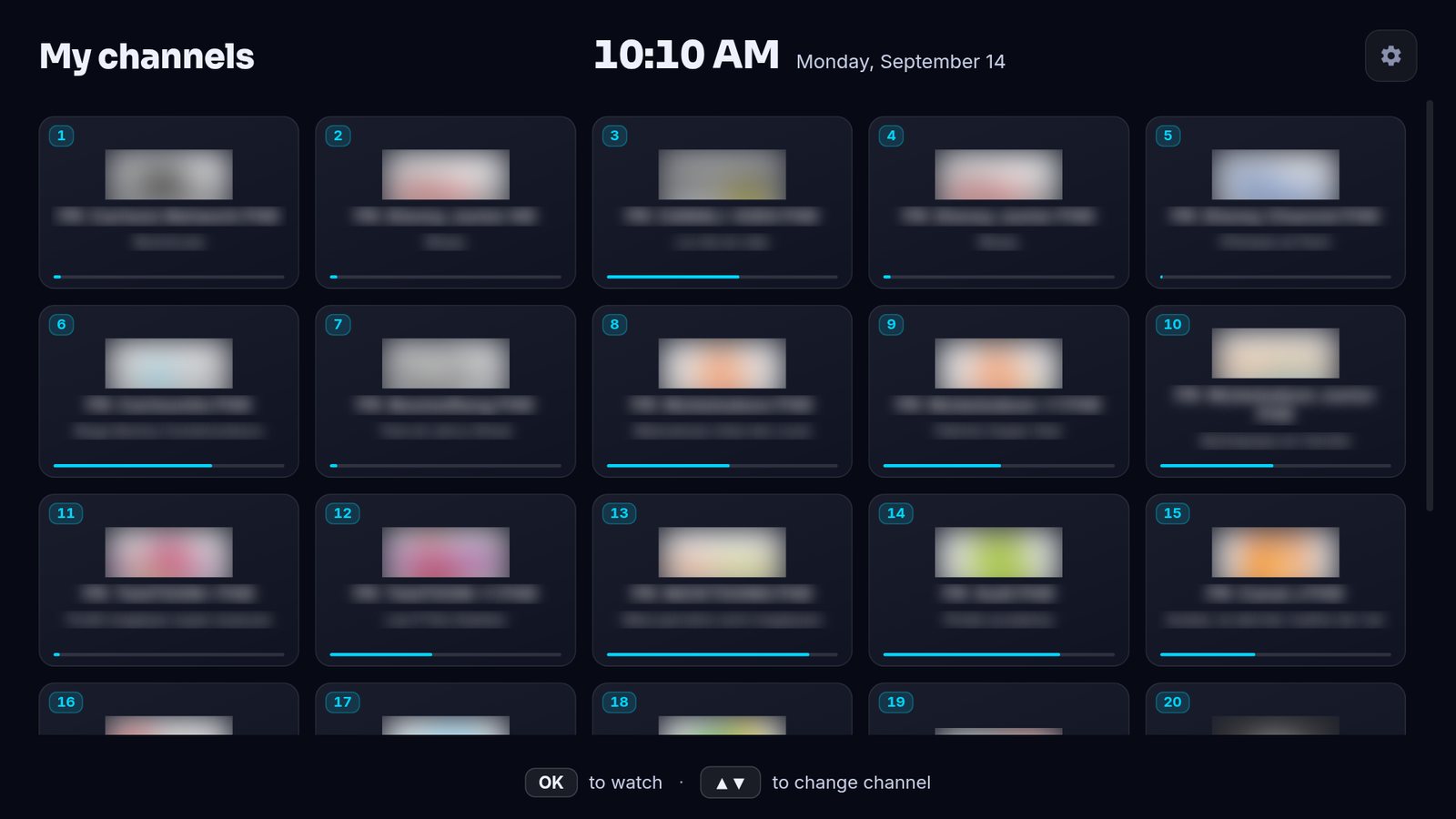
Simple Mode on Android TV. Channel names and logos blurred in this image.
The channel starts. That is the whole interaction. No menu to cross, no setting to find, nothing to memorise. It feels like an ordinary television again.
From your own profile, you build the list: by category, by search, with a quality filter, or by adding a whole bouquet at once. Editable any time, and your own profile stays untouched.
The device can boot straight into this grid. Press the remote, the channels are there. Nobody gets lost inside an application any more.
Every tile shows the current programme and a progress bar. You can see what has started, and how long ago, without opening anything.
Local & network media
The app can also play your personal movies, series and music, from your disk or your network.
Play local files (MP4, MKV, AVI, MP3, FLAC, WAV…) from the hard drive, a USB stick or an external disk. Works even offline.
On Android TV / Google TV, the app automatically scans the media present on the device and adds them to your catalog, with no setup.
Access to media shared on your local network (NAS, Windows SMB share). Feature still being refined — your feedback is welcome.
From the file name, the app finds the poster, synopsis, rating, genres and cast of your own films and series. With your own free key — nothing goes through our servers.
Optional & encrypted sync
Installing the app on a new screen? Sign in with Google → your IPTV, your profiles and your settings are restored in seconds. Without retyping a thing.
Optional, disabled by default. If you enable it, your data is backed up to your own Google Drive — not to us.
The backup file is encrypted on the device before being sent. Even Google can't read it. Only you have the key.
The app only accesses its own backup file. It never sees the rest of your Google Drive.
On a new device: sign in with Google → your IPTV connection, your favorites and your profiles are restored automatically.
Favorites, watchlist, playback resume, reminders and settings sync in the background between all your devices.
Privacy & trust
El S IPTV is a player, not a content provider — and certainly not a data harvester.
No banners, no pre-rolls, no advertising partnerships. You pay once, you watch in peace.
The app sends no telemetry, no usage statistics, no behavioral data.
Your IPTV credentials, your history and your favorites stay on the device by default. No central server.
If you enable sync, it's to your own Google Drive, encrypted in AES-256.
The application is a player. It does not provide, host or distribute any channel, any stream, any subscription.
El S IPTV is a media player. The application does not provide, distribute, or host any content — no TV channels, no IPTV streams, no movies, no series, no subscriptions. No catalog is shipped with the application.
The sources played by El S IPTV (Xtream Codes servers, M3U / M3U8 playlists, local files, network shares) are entirely supplied by the user. The user remains solely and entirely responsible for the legality of these sources, the subscriptions purchased from third-party providers, and the content they access via the application.
El S IPTV disclaims all responsibility for any use of the application with illegal sources, unauthorized subscriptions, or copyrighted content without a license. The user agrees to comply with the legislation in force in their country.
Platforms
We're rolling out progressively, keeping the same care on each platform.
Download the app from your device's store. The trial starts automatically on first launch. No card to enter.
Read the privacy policy